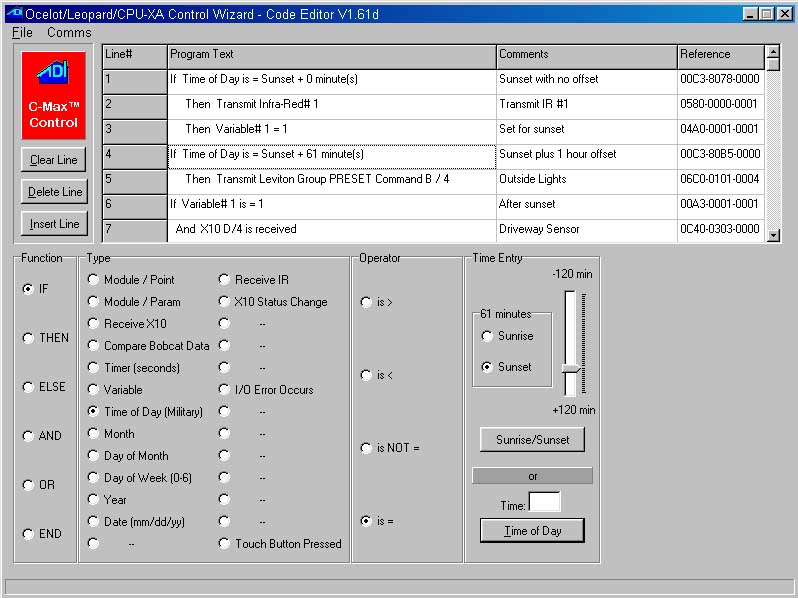
New V1.61d C-Max™ Software for the Leopard, Ocelot and CPU-XA
Let the "Control Wizard" write your program for you. Just point and click!
If you have trouble downloading files with Netscape RIGHT click the above link and choose Save Link As
Update Notes:
C-Max 1.61d
Upgrade increased number of Variables from 64 to 128
Upgrade Increased number of Timers from 32 to 64
Upgrade Increases offset for Sunrise/Sunset from +/- 30 minutes to +/ - 2 hours
Note: if you are currently using a program written using C-Max version 1.51e or older and are using Sunrise/Sunset, you will need to reset your Sunrise and Sunset offsets in your program. Simply go through the program and find any references to Sunrise/Sunset. Due to the larger offsets, your values will appear incorrect by 90 minutes . Using the program wizard, click on each Sunrise/Sunset program line and re-adjust the offset slider to your correct value. Once you have completed this, reload your program into the Ocelot or Leopard.
Upgrade for support of the Speak Easy and New Bobcat Modules
Upgrade
for sending out non-printable characters when sending ASCII
messages.
ASCII messages are entered in the CPU-XA Access Screen, under
Serial Messages. Non-Printable characters are entered beginning
with a caret ^ , and followed by 3 (and always 3) digits.
Carriage Returns are no longer appended to all strings.
If you need a Carriage Return add ^013 at the end of the string.
Example: To send “Hello World” with a carriage return
at the end you would enter “Hello World^013” (without
the quotes)
Parameter Additions in the Leopard/Ocelot support the following features:
Param
1 = Bobcat data re-map into variables. (subject
to change)
0 = off , non- zero : Variable[ (Bobcat address + Param 1)] = Bobcat data
Example: Set Param 1 to 15.... and Bobcat H address to 5. Now, Bobcat data (addressed to 5) appears in variable 20. Bobcat data (addressed to 6) appears in variable 21 ..and so on
Param
20 = maximum IR number to compare to on IR receive
Note. .the larger the
number.. the greater the time required to check for a match so
leave at 80 unless you really need more.
Param
21 = Re-Map RCS X10 Thermostat temperatures into
variables.
0 = off 1 = Map RCS Temperature House A-P into Variables 64-79
Param 22 = First non-zeroed variable on power-up
Example: set to 40 and
variables 40-127 will retain last data through power-down to
power-up
Param 23 = internal use...always leave at 0 (subject to change).
C-Max 1.51e
Upgrade for ability to Master/Slave for Leopard's, Ocelots and CPU-XAs. Set the master's parameter 14 to 0 and the slave to 1 for the 1st one and 2 for the 2nd and so on. If you have other modules then auto address them by skipping the highest slave address first ( the slaves do not auto address) and then addressing them normally. Example : If you have 2 slaves and a SECU 16 the first slave must to be set to 1 and the other set to 2 then auto address the SECU 16 by clicking the skip button until it say's addressing unit 3 then push the button on the SECU 16 until the display shows addressing unit 4.
C-Max 1.51d
Upgrade to the IR compare algorithm to improve the matching of extra-long initial IR pulses.
C-Max 1.51c
First day of winter Sunrise/Sunset Bug - Install C-Max 1.51d and re-load your application program. (stored in the PGM file)
Version 2.55 or later
After loading Application Ver 2.55s new executive. Set CPU-XA, Ocelot or Leopard parameter 13 to a "0" for Alpha Pager Support of 1 PIN and 15 Messages. Set CPU-XA, Ocelot or Leopard parameter 13 to a "1" for Alpha Pager Support of 2 PINs and 2 Messages each. Variable 60 now shows the LAST Infra-Red command RECEIVED. It is written over with each IR command, a receive with no match shows 65535.
Version 2.53 or Later
After loading Application Ver 2.53's new executive. Set CPU-XA, Ocelot or Leopard parameter 14 to a "0" for a master unit. The next software version will allow you to address other CPU-XAs, Ocelots or Leopards as slaves by setting this parameter to a 1,2,3,etc... To set this parameter do the following. From C-Max, choose Comms, Attach to CPU-XA, CPU-XA Utility, Retrieve CPU-XA Parameter and if parameter 14 is not set to a "0" click on the number and set it to "0".